[TOC]
业务需求
分析
redis
每周或是每天的最热门的歌曲
缓存
热点数据做一个缓存
实现
要实现每周或每天的最热门歌曲缓存功能,可以通过以下步骤来实现:
- 数据统计和更新:
- 在数据库中存储歌曲数据,并为每首歌曲添加一个字段来记录该歌曲的播放次数或热度值。
- 定时任务或触发器:每天或每周定时统计歌曲的播放次数,并更新到数据库中。
- 缓存策略:
- 使用 Redis 缓存每周或每天的最热门歌曲数据。
- 在 Redis 中存储每周或每天的最热门歌曲数据,可以使用有序集合(Sorted Set)来存储,以歌曲每天播放次数作为分数,歌曲 ID 或名称作为成员。
- 定时更新缓存:
- 在每天或每周的统计任务完成后,将最热门的歌曲数据更新到 Redis 缓存中。
- 可以使用 Redis 的过期时间功能,设置缓存数据的过期时间,以便在下一次更新时自动更新缓存数据。
- 查询和使用缓存:
- 当用户需要获取最热门歌曲数据时,先查询 Redis 缓存中是否存在对应的数据。
- 如果缓存中存在数据,则直接返回给用户;如果缓存中不存在数据,再从数据库中查询并更新缓存。
通过以上步骤和实现方式,实现每周或每天的最热门歌曲缓存功能,减少数据库的压力并提高数据访问效率。
具体逻辑
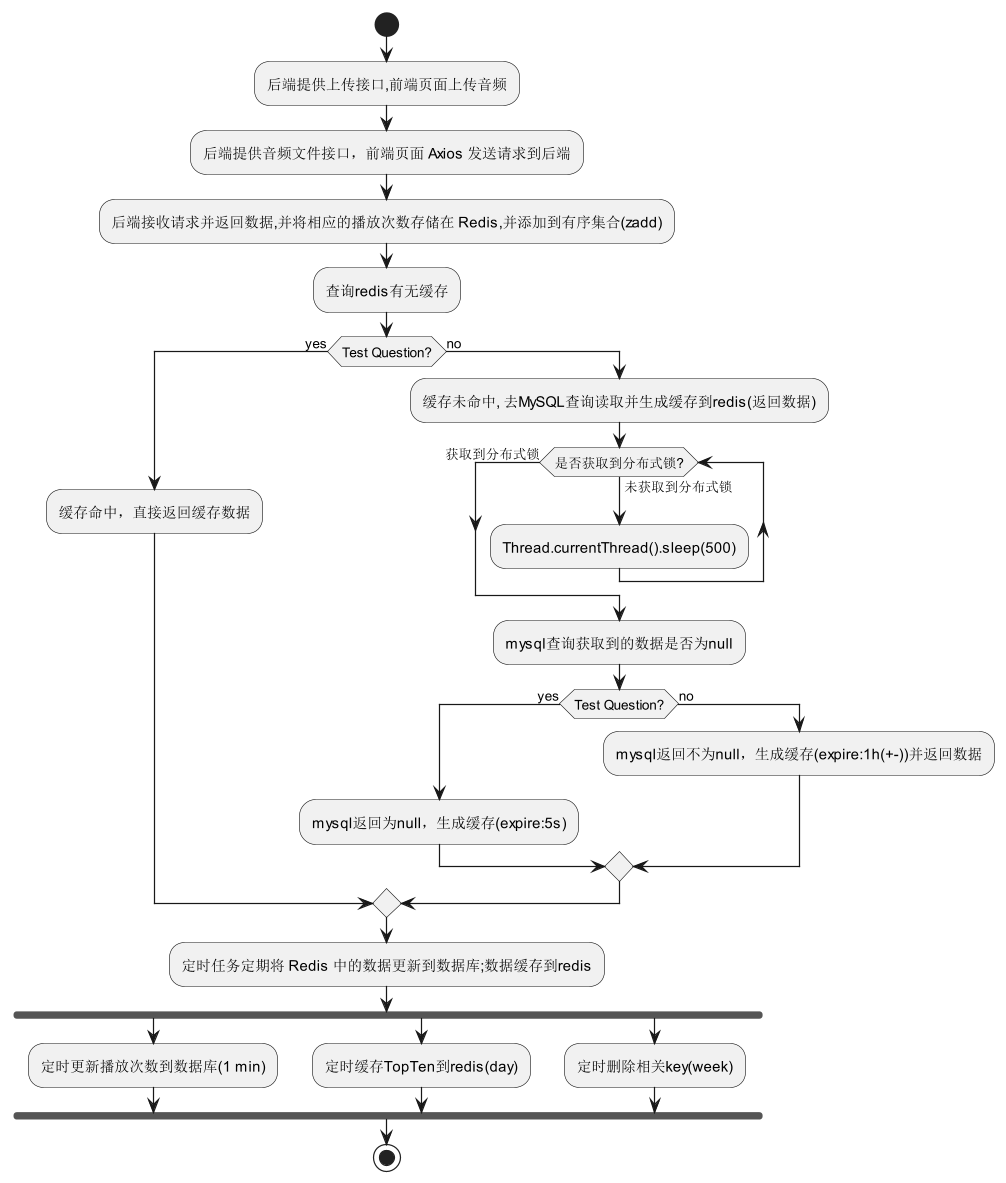
功能实现
具体类文件
1
2
3
4
5
6
7
8
9
10
11
12
13
14
15
16
17
18
19
20
21
22
23
24
25
26
27
28
|
Rhythm
│
├─annotation
│      RedisCache.java
│
├─aop
│      RedisAspect.java
│
├─controller
│  ├─music
│  │      MusicController.java
│
├─mapper
│      MusicMapper.java
│
├─service
│  │  MusicService.java
│  │
│  └─impl
│          MusicServiceImpl.java
│
├─task
│      MusicTasks.java
│
└─utils
        AudioParserUtils.java
|
数据统计和更新:
- 在数据库中存储歌曲数据,并为每首歌曲添加一个字段来记录该歌曲的播放次数或热度值。
1
2
3
4
| 表名:music
数据列:
music_play_count 播放次数统计
music_play_count_week 本周播放次数统计
|
- 定时任务或触发器:每天或每周定时统计歌曲的播放次数,并更新到数据库中。
1
2
| ├─task
│ MusicTasks.java
|
1
2
3
4
5
6
7
8
9
10
11
12
13
14
15
16
17
18
19
20
21
22
23
24
25
26
27
28
29
30
31
32
33
34
35
36
37
38
39
40
41
42
43
44
45
46
|
package com.test.task;
@Component
public class MusicTasks {
@Resource
private MusicMapper musicMapper;
@Resource
private RedisUtil redisUtil;
@Scheduled(fixedRate = 60000)
@Transactional
public void updatePlayCounts() {
}
@Scheduled(cron = "0 0 0 * * *")
@Transactional
public void setTopTenPlayCache() throws IOException {
}
@Scheduled(cron = "0 0 0 * * MON")
@Transactional
public void PlayCountByWeekCleanupTask() {
}
|
缓存策略:
- 使用 Redis 缓存每天的Top10歌曲数据。
- 在 Redis 中存储每天的歌曲播放次数统计数据,使用有序集合(Sorted Set)来存储,以歌曲播放次数作为分数,歌曲文件名 作为成员。
1
2
3
4
5
6
7
8
9
10
11
12
13
14
15
16
17
18
19
20
21
22
23
24
|
package com.test.utils;


@Component
public class AudioParserUtils {


    @Resource
    private RedisUtil redisUtil;


    public void incrementPlayCount(String music_id) {
        redisUtil.incr("audio:playcountByWeekByMusicId:" + music_id, 1);
    }

}


audioParserUtils.incrementPlayCount(Arrays.stream(joinPoint.getArgs()).iterator().next().toString());

ZSetOperations<String, Object> zSetOps = redisUtil.zSet();
zSetOps.add("audio:topSongsByPlaycount", filename, (Integer) redisUtil.get("audio:playcountByWeekByMusicId:" + Arrays.stream(joinPoint.getArgs()).iterator().next().toString()));
|
定时更新缓存:
- 时间间隔 1min,将歌曲播放次数统计数据更新到 数据库
music表的music_play_count music_play_count_week字段。
1
2
3
4
5
6
7
8
9
10
11
12
13
14
15
16
17
18
19
20
21
22
23
24
25
| @Scheduled(fixedRate = 60000)
@Transactional
public void updatePlayCounts() {
Set<String> keys = redisUtil.keys("audio:playcountByWeekByMusicId:*");
if (keys != null) {
for (String key : keys) {
Integer playCountCurrentWeek = (Integer) redisUtil.get(key);
if (playCountCurrentWeek != null) {
String music_id = key.replace("audio:playcountByWeekByMusicId:", "");
System.out.println(music_id);
Music audioFile = musicMapper.selectById(music_id);
if (audioFile != null) {
audioFile.setMusicPlayCountWeek(playCountCurrentWeek);
musicMapper.updateById(audioFile);
}
}
}
}
}
|
- 每天,查询有序集合中计数最高的前十个元素(歌曲)并将Top10的歌曲音频数据更新到 Redis 缓存中。
1
2
3
4
5
6
7
8
9
10
11
12
13
14
15
16
17
18
19
20
21
22
23
24
25
26
27
28
29
30
| @Scheduled(cron = "0 0 0 * * *")
@Transactional
public void setTopTenPlayCache() throws IOException {
Set<ZSetOperations.TypedTuple<Object>> topTenSongs = redisUtil.reverseRangeWithScores("audio:topSongsByPlaycount", 0, 1);
System.out.println(topTenSongs);
for (ZSetOperations.TypedTuple<Object> tuple : topTenSongs) {
String songName = new String(String.valueOf(tuple.getValue()));
System.out.println("Storing song: " + songName + ", Count: " + tuple.getScore());
String filename = songName;
System.out.println(filename);
File file = new File(
ResourceUtils.getURL("classpath:").getPath() +
"static/audio/" + filename
);
System.out.println(file);
byte[] bytes = FileUtils.readFileToByteArray(file);
redisUtil.set("audio:file:playcountByWeekByMusicId:" + songName, bytes);
}
}
|
- 每周定时清除redis相关key;
music_play_count_week数据累加到music_play_count字段。
1
2
3
4
5
6
7
8
9
10
11
12
13
14
15
16
17
18
19
20
21
22
23
24
25
26
27
28
29
30
31
32
33
34
35
36
37
38
39
40
41
42
43
44
45
46
47
48
49
50
51
52
53
54
55
56
57
58
59
60
61
62
63
64
65
66
| @Scheduled(cron = "0 0 0 * * MON")
@Transactional
public void PlayCountByWeekCleanupTask() {
Set<String> keysToDelete = redisUtil.keys("audio:playcountByWeekByMusicId:*");
if (!keysToDelete.isEmpty()) {
for (String key : keysToDelete) {
Integer playCountCurrentWeek = (Integer) redisUtil.get(key);
Integer playCount = null;
if (playCountCurrentWeek != null) {
String music_id = key.replace("audio:playcountByWeekByMusicId:", "");
System.out.println(music_id);
Music audioFile = musicMapper.selectById(music_id);
playCount = playCountCurrentWeek + audioFile.getMusicPlayCount();
if (audioFile != null) {
audioFile.setMusicPlayCountWeek(playCountCurrentWeek);
audioFile.setMusicPlayCount(playCount);
musicMapper.updateById(audioFile);
}
redisUtil.del(key);
System.out.println("Cleared Redis keys: " + key);
}
}
}
else {
System.out.println("No keys found to clear.");
}
Set<String> keysTopTenCacheToDelete = redisUtil.keys("audio:file:playcountByWeekByMusicId:*");
if (!keysTopTenCacheToDelete.isEmpty()) {
for (String key : keysTopTenCacheToDelete) {
redisUtil.del(key);
System.out.println("Cleared TopTenCache Redis keys: " + key);
}
}
else {
System.out.println("No TopTenCache keys found to clear.");
}
Set<String> keysTopSongsByPlaycountToDelete = redisUtil.keys("audio:topSongsByPlaycount");
if (!keysTopSongsByPlaycountToDelete.isEmpty()) {
for (String key : keysTopSongsByPlaycountToDelete) {
redisUtil.del(key);
System.out.println("Cleared TopSongsByPlaycount Redis keys: " + key);
}
}
else {
System.out.println("No TopSongsByPlaycount keys found to clear.");
}
}
|
- 可以使用 Redis 的过期时间功能,设置缓存数据的过期时间,以便在下一次更新时自动更新缓存数据。
查询和使用缓存:
- 当用户需要获取最热门歌曲数据时,先查询 Redis 缓存中是否存在对应的数据。
- 如果缓存中存在数据,则直接返回给用户;如果缓存中不存在数据,再从数据库中查询并更新缓存。
1
2
3
4
5
6
7
8
9
10
11
12
13
14
15
16
17
|
package com.test.annotation;
import java.lang.annotation.*;
@Documented
@Target(ElementType.METHOD)
@Retention(RetentionPolicy.RUNTIME)
public @interface RedisCache {
long duration() default 0;
}
|
1
2
3
4
5
6
7
8
9
10
11
12
13
14
15
16
17
18
19
20
21
22
23
24
25
26
27
28
29
30
31
32
33
34
35
36
37
38
39
40
41
42
43
44
45
46
47
48
49
50
51
52
53
54
55
56
57
58
59
60
61
62
63
64
65
66
67
68
69
70
71
72
73
74
75
76
77
78
79
80
81
82
83
84
85
86
87
88
89
90
91
92
93
94
95
96
97
98
99
100
101
102
103
104
105
106
107
108
109
110
111
112
113
114
115
116
117
118
119
120
|
package com.test.aop;
@Component
@Aspect
@Slf4j
public class RedisAspect {
private static final Logger logger = LoggerFactory.getLogger(RedisAspect.class);
@Resource
private MusicMapper musicMapper;
@Resource
private RedisUtil redisUtil;
@Resource
private AudioParserUtils audioParserUtils;
@Pointcut("execution(* com.test.controller.music.MusicController.playAudio(..))")
public void TopTenCachepointCut(){}
@Around( value = "@annotation(redisCache)" )
public Object around(ProceedingJoinPoint joinPoint , RedisCache redisCache) throws Throwable {
System.out.println( "Redis ==> 开启缓存策略! " );
log.info( "Redis ==> 开启缓存策略! " );
Map<String,Object> keyMap = new HashMap<>();
keyMap.put( "signature" , joinPoint.getSignature().toString() );
keyMap.put( "arguments" , joinPoint.getArgs() );
String key = JSON.toJSONString( keyMap );
while( true ) {
System.out.println("Redis ==> 去Redis中查询缓存数据! ");
logger.info("Redis ==> 去Redis中查询缓存数据! ");
Object cacheData = redisUtil.get(key);
if (cacheData != null) {
System.out.println("Redis ==> 缓存命中,直接返回缓存数据! ");
logger.info("Redis ==> 缓存命中,直接返回缓存数据! ");
audioParserUtils.incrementPlayCount(Arrays.stream(joinPoint.getArgs()).iterator().next().toString());
String filename = musicMapper.selectById(Arrays.stream(joinPoint.getArgs()).iterator().next().toString()).getMusicFile();
System.out.println(filename);
logger.info("filename ==> " + filename);
ZSetOperations<String, Object> zSetOps = redisUtil.zSet();
zSetOps.add("audio:topSongsByPlaycount", filename, (Integer) redisUtil.get("audio:playcountByWeekByMusicId:" + Arrays.stream(joinPoint.getArgs()).iterator().next().toString()));
return "null".equals(cacheData) ? null : cacheData;
}
if ( redisUtil.setnx("Mutex-" + key, 5000) ) {
System.out.println("Redis ==> 缓存未命中,去MySQL查询数据! ");
logger.info("Redis ==> 缓存未命中,去MySQL查询数据! ");
Object returnValue = joinPoint.proceed();
System.out.println("Redis ==> 生成缓存到Redis中! ");
logger.info("Redis ==> 生成缓存到Redis中! ");
if (returnValue == null) {
redisUtil.set(key, "null", 5);
} else {
redisUtil.set(
key,
returnValue,
redisCache.duration() + (int)( Math.random() * redisCache.duration() / 10 )
);
}
return returnValue;
} else {
Thread.currentThread().sleep(500);
}
}
}
}
|
1
2
3
4
5
6
7
8
9
10
11
12
13
14
15
16
17
18
19
20
21
22
23
24
| package com.test.controller.music;
@Controller
@Api(tags = "音乐模块")
@RequestMapping("/api")
@CrossOrigin
public class MusicController {
@Autowired
private MusicService musicService;
@RedisCache( duration = 60 * 60 )
@GetMapping(value = "/playAudio/{music_id}", produces = MediaType.APPLICATION_OCTET_STREAM_VALUE)
@ResponseBody
public String playAudio(@PathVariable String music_id) throws IOException {
return musicService.plyaAudio(music_id);
}
}
|
1
2
3
4
5
6
7
8
9
10
11
12
13
14
15
16
17
18
19
20
21
22
23
24
25
26
27
28
29
30
31
32
33
34
35
36
37
38
39
40
41
42
43
44
45
46
47
| package com.test.service.impl;
@Service
public class MusicServiceImpl extends ServiceImpl<MusicMapper, Music>
implements MusicService {
@Resource
private MusicMapper musicMapper;
@Resource
private RedisUtil redisUtil;
@Resource
private AudioParserUtils audioParserUtils;
@Override
public String plyaAudio(String music_id) throws IOException {
String filename = musicMapper.selectById(music_id).getMusicFile();
System.out.println(filename);
String filePath = ResourceUtils.getURL("classpath:").getPath() +
"static/audio/" + filename;
String fileNewPath = filePath.substring(1);
System.out.println("fileNewPath: " + fileNewPath);
Path audioFilePath = Paths.get( fileNewPath );
audioParserUtils.incrementPlayCount(music_id);
ZSetOperations<String, Object> zSetOps = redisUtil.zSet();
zSetOps.add("audio:topSongsByPlaycount", filename, (Integer) redisUtil.get("audio:playcountByWeekByMusicId:" + music_id));
return Arrays.toString(Files.readAllBytes(audioFilePath));
}
}
|
参考:
查询历史热点Key
Redis程序设计中,上百万的新闻,如何实时展示最热点的top10条呢