[TOC]
业务需求
1
| 数据(音频文件)更新操作,如何确保数据库中的数据和Redis缓存中的数据一致
|
分析
在确保数据库和 Redis 缓存数据一致性时,需要根据具体的业务需求和系统特点选择合适的策略。可以考虑使用消息队列和分布式事务确保强一致性,同时结合乐观锁和版本控制可以更好地处理并发问题。
前置
- Spring Boot:使用Spring Boot框架。
- Kafka:使用Kafka作为消息队列系统。
- Mybatis:使用Mybatis进行数据库操作。
- Redis:使用Redis作为缓存系统。
实现
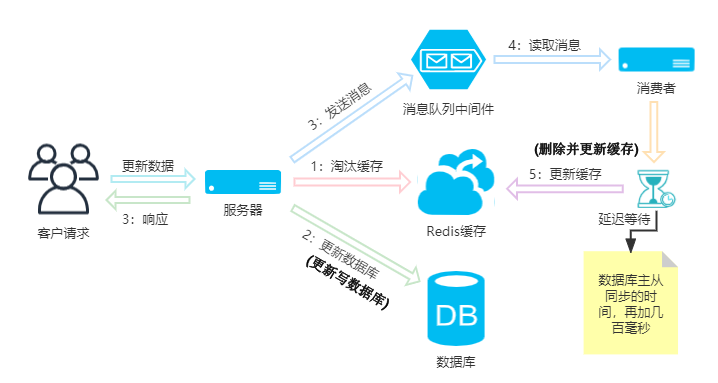
- 第一次删除缓存:在更新数据库之前删除缓存。
- 更新数据库:执行数据库更新操作。
- 发送消息到消息队列:数据库更新完成后,发送一条消息到消息队列请求再次删除缓存。
- 从消息队列消费消息:消息队列消费者读取到消息,延迟一段时间 (延迟时间设置为,数据库主从同步的时间,再加几百毫秒) , 消息队列的消费者再次删除缓存。
具体逻辑
功能实现
具体类文件
1
2
3
4
5
6
7
8
9
10
11
12
13
14
15
16
17
18
19
20
21
22
23
24
25
26
27
28
|
Rhythm
├─src
│  ├─main
│  │  ├─java
│  │  │  └─com
│  │  │      └─test
│  │  │          │
│  │  │          ├─consumer
│  │  │          │      UploadAudioFileCacheConsumer.java
│  │  │          │
│  │  │          ├─controller
│  │  │          │  │  FileController.java
│  │  │          │  │
│  │  │          │  ├─music
│  │  │          │  │      MusicController.java
│  │  │          │
│  │  │          ├─mapper
│  │  │          │      MusicMapper.java
│  │  │          │
│  │  │          ├─service
│  │  │          │  │  CacheService.java
│  │  │          │  │  MusicService.java
│  │  │          │  │
│  │  │          │  └─impl
│  │  │          │          CacheServiceImpl.java
│  │  │          │          MusicServiceImpl.java
|
代码实现
1
2
3
4
5
6
7
| @PostMapping("/upload/audioFile/{music_id}")
@ResponseBody
public Object uploadAudioFileByMusicId( @RequestParam("multipartFile") MultipartFile multipartFile, @PathVariable("music_id") Integer music_id ) throws IOException, NoSuchMethodException {
return musicService.uploadAudioFileByMusicId(multipartFile,music_id);
}
|
1
2
3
4
5
6
7
8
9
10
11
12
13
14
15
16
17
18
19
20
21
22
23
24
25
26
27
28
29
30
31
32
33
34
35
36
37
38
39
40
| @Component
public class UploadAudioFileCacheConsumer {
@Resource
private CacheService cacheService;
private final ScheduledExecutorService scheduler = Executors.newScheduledThreadPool(1);
@KafkaListener(topics = "uploadAudioFileCacheDelete-topic", groupId = "my-group")
public void consume(ConsumerRecord<String,String> record, Acknowledgment acknowledgment) {
System.out.println("==> 延迟处理消息,等待数据库主从同步..., 时间为1秒,再加500毫秒");
long delay = 15000L;
scheduler.schedule(() -> {
try {
System.out.println("==> 再次删除缓存(保证双删)");
Integer music_id = Integer.valueOf(JSON.parseObject( record.key() , String.class ));
cacheService.deleteCache(music_id);
acknowledgment.acknowledge();
} catch (Exception e) {
e.printStackTrace();
}
}, delay, TimeUnit.MILLISECONDS);
}
}
|
1
2
3
4
5
6
7
8
9
10
11
12
13
14
15
16
17
18
19
20
21
22
23
24
25
26
27
28
29
30
31
32
33
34
35
36
37
38
39
40
41
42
43
44
45
46
47
48
49
50
51
52
53
54
55
56
57
58
59
60
61
62
63
64
65
66
67
68
69
70
71
72
73
74
75
76
77
78
79
80
81
82
83
84
85
86
87
88
89
90
91
92
93
94
95
96
97
98
99
100
101
102
103
104
105
| @Override
public Object uploadAudioFileByMusicId( MultipartFile multipartFile, Integer music_id) throws IOException, NoSuchMethodException {
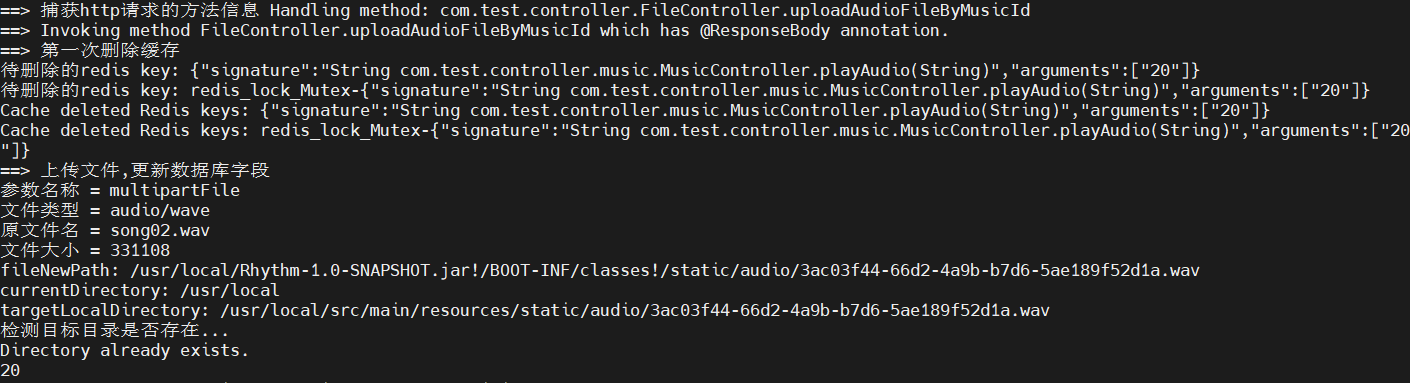
System.out.println("==> 第一次删除缓存");
cacheService.deleteCache(music_id);
System.out.println("==> 上传文件,更新数据库字段");
System.out.println( "参数名称 = " + multipartFile.getName() );
System.out.println( "文件类型 = " + multipartFile.getContentType() );
System.out.println( "原文件名 = " + multipartFile.getOriginalFilename() );
System.out.println( "文件大小 = " + multipartFile.getSize() );
if( ! multipartFile.getContentType().startsWith("audio/") ){
System.out.println( "==> 上传的文件不是音频文件,上传失败" );
return null;
}
if( multipartFile.getSize() > 20 * 1024 * 1024 ){
System.out.println( "==> 上传的文件最多20MB,上传失败" );
return null;
}
String filename = UUID.randomUUID().toString() +
multipartFile.getOriginalFilename().substring( multipartFile.getOriginalFilename().lastIndexOf(".") );
String filePath = ResourceUtils.getURL("classpath:").getPath() +
"static/audio/" + filename;
String fileNewPath = null;
if (filePath.startsWith("/")) {
fileNewPath = filePath.substring(1);
} else if (filePath.startsWith("file:") ) {
fileNewPath = filePath.replaceFirst("^file:", "");
} else {
fileNewPath = filePath;
}
System.out.println("fileNewPath: " + fileNewPath);
File target = new File(fileNewPath);
String currentDirectory = System.getProperty("user.dir");
System.out.println("currentDirectory: " + currentDirectory);
String targetLocalDirectory = currentDirectory + "/src/main/resources/static/audio/" + filename;
System.out.println("targetLocalDirectory: " + targetLocalDirectory);
System.out.println("检测目标目录是否存在... ");
if (Files.notExists(Path.of(currentDirectory + "/src/main/resources/static/audio/"))) {
System.out.println("Directory does not exist. Creating now...");
Files.createDirectories(Path.of(currentDirectory + "/src/main/resources/static/audio/"));
System.out.println("Directory created.");
} else {
System.out.println("Directory already exists.");
}
multipartFile.transferTo(new File(targetLocalDirectory));
System.out.println("使用乐观锁更新数据库...");
Boolean existingAudioFile = musicMapper.selectById(music_id).getMusicFile().isEmpty();
Optional<Boolean> optionalTrue = Optional.of(existingAudioFile);
boolean value = optionalTrue.orElseThrow(() -> new RuntimeException("AudioFile not found"));
System.out.println("Value: " + value);
updateMusic(music_id,filename);
System.out.println("==> 上传文件,更新数据库字段完成,发送一条消息到消息队列请求再次删除缓存");
kafkaTemplate.send( "uploadAudioFileCacheDelete-topic" , JSON.toJSONString( music_id ) , null );
return "File upload successful: " + fileNewPath +", " + targetLocalDirectory;
}
|
1
2
3
4
5
6
7
8
9
10
11
12
13
14
15
16
17
18
19
20
21
22
23
24
25
26
27
28
29
30
31
32
33
34
35
36
37
38
39
40
41
42
43
| @Service
public class CacheServiceImpl implements CacheService {
@Resource
private RedisUtil redisUtil;
@Override
public boolean deleteCache(Integer music_id) {
Class<MusicController> musicControllerClass = MusicController.class;
String theParameter = String.valueOf(music_id);
String[] numbers = {theParameter};
Map<String,Object> keyMap = new HashMap<>();
keyMap.put( "signature" , "String com.test.controller.music.MusicController.playAudio(String)" );
keyMap.put( "arguments" , numbers );
String key = JSON.toJSONString( keyMap );
String key_redis_lock_Mutex = "redis_lock_Mutex-" + JSON.toJSONString( keyMap );
System.out.println("待删除的redis key: " + key);
System.out.println("待删除的redis key: " + key_redis_lock_Mutex);
redisUtil.del(key);
System.out.println("Cache deleted Redis keys: " + key);
redisUtil.del(key_redis_lock_Mutex);
System.out.println("Cache deleted Redis keys: " + key_redis_lock_Mutex);
return false;
}
}
|
1
2
3
4
5
6
7
| @RedisCache( duration = 60 * 60 )
@GetMapping(value = "/playAudio/{music_id}", produces = MediaType.APPLICATION_OCTET_STREAM_VALUE)
@ResponseBody
public String playAudio(@PathVariable String music_id) throws IOException {
return musicService.playAudio(music_id);
}
|
1
2
3
4
5
6
7
8
9
10
11
12
13
14
15
16
17
18
19
20
21
22
23
24
25
26
27
28
29
30
31
32
33
34
35
36
37
38
39
40
41
42
43
44
45
46
47
48
49
50
51
52
53
54
55
56
57
58
59
60
61
62
63
64
65
66
67
68
69
70
71
72
73
74
75
76
77
78
79
80
81
82
83
84
85
86
87
88
89
90
| @Override
public String playAudio(String music_id) throws IOException {
String filename = null;
try {
filename = musicMapper.selectById(music_id).getMusicFile();
System.out.println(filename);
String filePath = ResourceUtils.getURL("classpath:").getPath() +
"static/audio/" + filename;
String fileNewPath = null;
if (filePath.startsWith("/")) {
fileNewPath = filePath.substring(1);
} else if (filePath.startsWith("file:") ) {
fileNewPath = filePath.replaceFirst("^file:", "");
} else {
fileNewPath = filePath;
}
System.out.println("fileNewPath: " + fileNewPath);
Path audioFilePath = Paths.get(fileNewPath);
File file = new File(
fileNewPath
);
File file_setLocation = new File(
System.getProperty("user.dir") + "/src/main/resources/static/audio/" + filename
);
System.out.println("file: " + file);
System.out.println("file_setLocation: " + file_setLocation);
org.springframework.core.io.Resource resource = resourceLoader.getResource(fileNewPath);
System.out.println("org.springframework.core.io.Resource: " + resource);
InputStream inputStream = getClass().getClassLoader().getResourceAsStream("static/audio/" + filename);
System.out.println("inputStream: " + inputStream);
if (inputStream != null || file.exists() || file_setLocation.exists()) {
System.out.println("文件存在");
audioParserUtils.incrementPlayCount(music_id);
ZSetOperations<String, Object> zSetOps = redisUtil.zSet();
zSetOps.add("audio:topSongsByPlaycount", filename, (Integer) redisUtil.get("audio:playcountByWeekByMusicId:" + music_id));
if (inputStream != null) {
System.out.println("return inputStream.readAllBytes()");
return Arrays.toString(inputStream.readAllBytes());
} else if (file.exists()) {
System.out.println("return Files.readAllBytes(audioFilePath)");
return Arrays.toString(Files.readAllBytes(audioFilePath));
} else {
System.out.println("return Files.readAllBytes(file_setLocation.toPath())");
return Arrays.toString(Files.readAllBytes(file_setLocation.toPath()));
}
} else {
System.out.println("File does not exist: " + filename);
audioParserUtils.incrementPlayCount(music_id);
ZSetOperations<String, Object> zSetOps = redisUtil.zSet();
zSetOps.add("audio:topSongsByPlaycount", filename, (Integer) redisUtil.get("audio:playcountByWeekByMusicId:" + music_id));
return null;
}
} catch (Exception e) {
throw new RuntimeException("Error loading file " + filename, e);
}
}
|
case演示
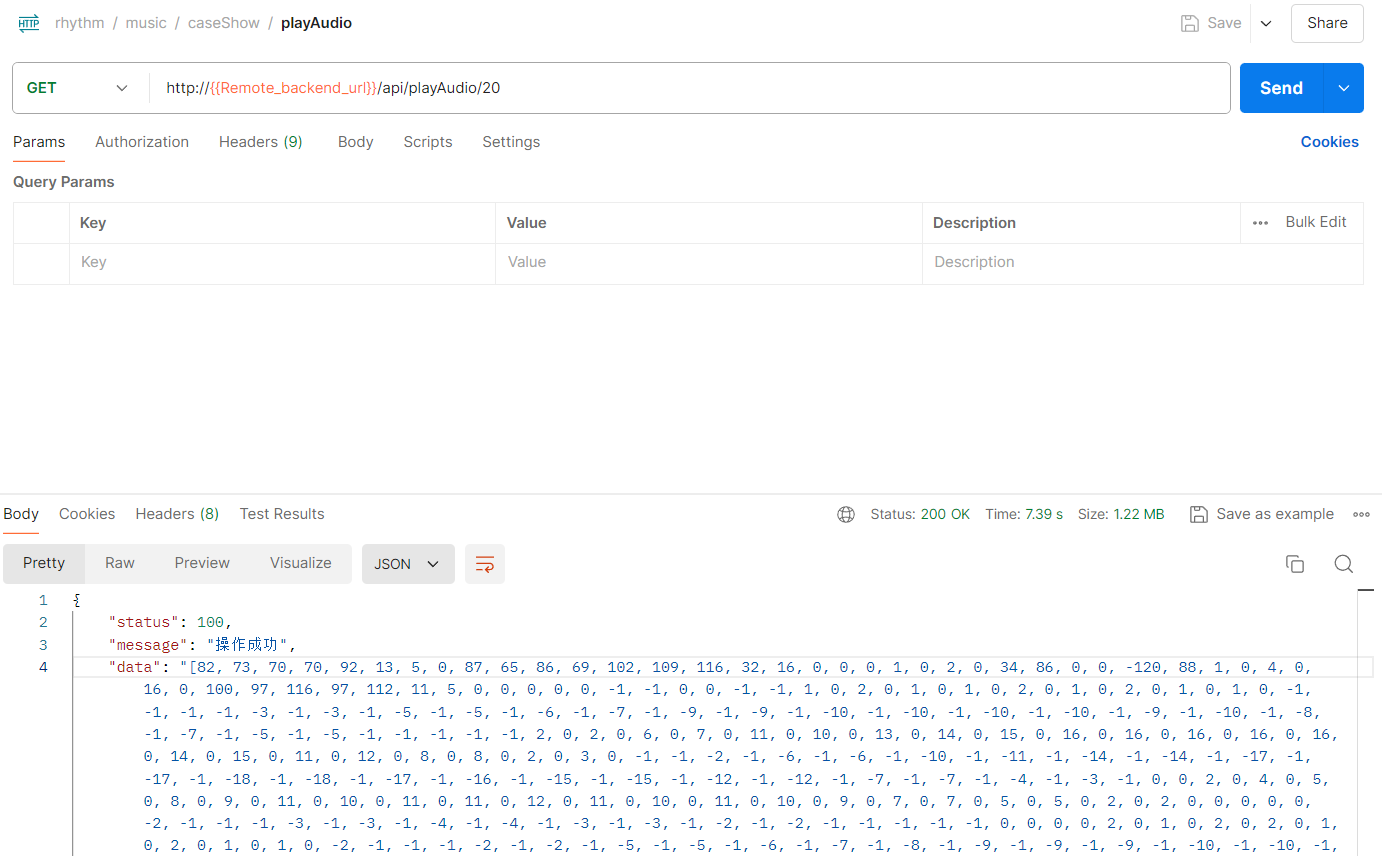
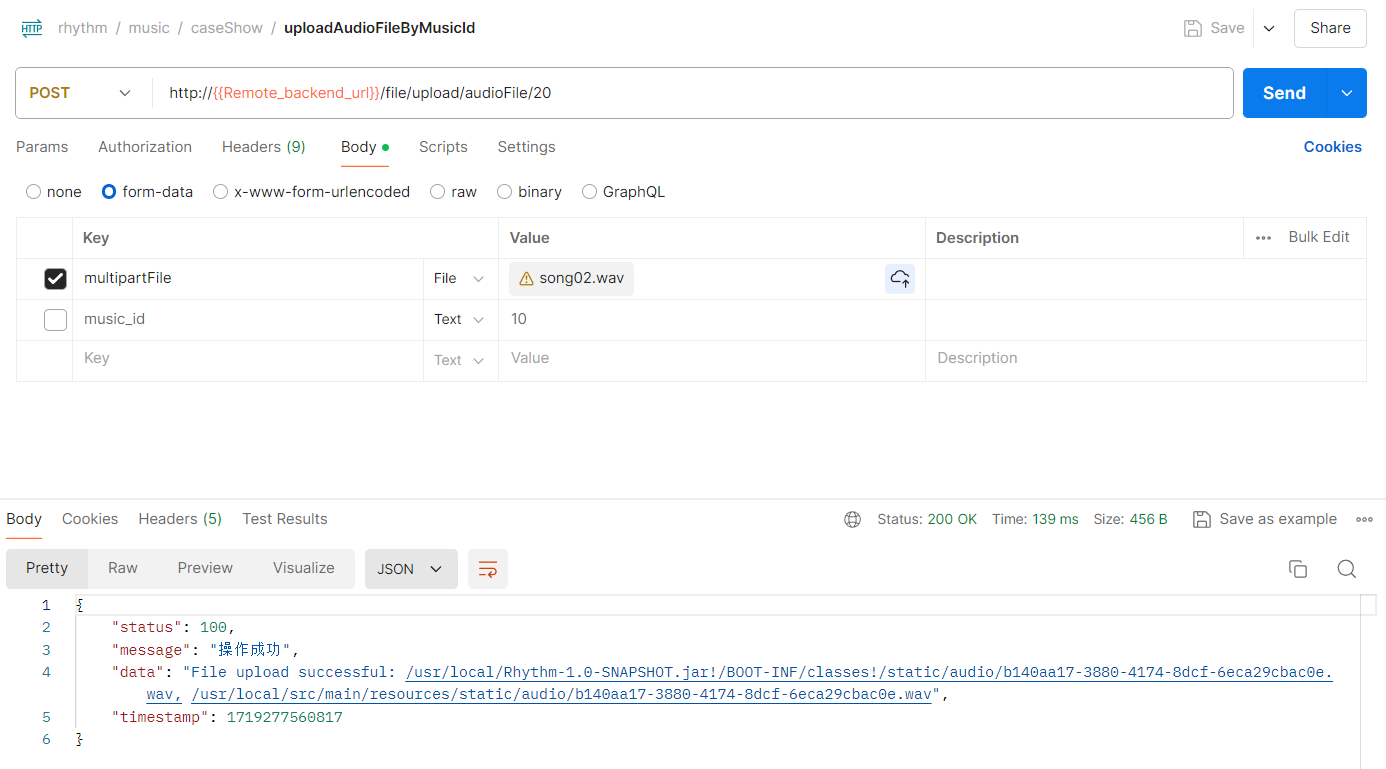
- 首先查询redis是否有缓存, 无, 查询数据库并生成缓存


- 播放音频, 查询redis有缓存, 直接返回缓存数据



参考:
[1] 倪炜, 分布式消息中间件实践. 电子工业出版社, 2018.
相关问题
双删缓存
在更新数据库之前和之后各进行一次缓存删除
- 第一次删除缓存:在更新数据库之前删除缓存,目的是使缓存中的旧数据失效,避免在数据库更新过程中其他请求访问到旧数据。
- 第二次删除缓存:在数据库更新之后再次删除缓存,确保在数据库更新过程中 ( 写从数据库数据写入 + 读主数据库从写从数据库同步数据 ) 可能新插入的缓存被正确清理掉。这一步特别重要,因为在高并发的情况下,可能会有新的读请求在数据库更新和第一次删除缓存之间写入了缓存。
双删
双删策略(Double Delete Cache Strategy)是一种在缓存一致性中使用的方法,用于确保在高并发情况下,缓存和数据库的数据保持一致。它通过在数据库更新操作前后两次删除缓存,来减少数据不一致的情况出现。下面详细解释为什么需要两次删除缓存以实现缓存一致性:
1. 第一次删除缓存
目的
在更新数据库之前首先删除缓存项,确保在你开始数据库操作时,已有的旧缓存数据被清除。
原因
- 防止脏数据读取:防止读请求在更新数据库之前读取到旧的、不准确的缓存数据。
- 减少并发更新:避免在接下来的数据库更新操作中,有读请求命中了旧的缓存数据。
2. 数据库更新
在缓存被清除后,执行数据库的更新操作。
3. 第二次删除缓存
数据库更新成功后,再次删除缓存(利用异步消息的方式),以覆盖可能由并发操作带来的不一致风险。
目的
确保更新后的最新数据被正确缓存。
原因
- 处理并发写操作:在缓存删除到数据库更新的过程中,可能有并发写操作再次向缓存中写入了旧数据。
- 确保最终一致性:通过异步消息(如Kafka)在数据库更新完成后再次删除缓存,确保缓存中的数据与数据库中的数据最终一致。
示例流程图
初始数据状态
- 缓存:Old Value
- 数据库:Old Value
第一次删除缓存
数据库更新
第二次删除缓存(异步消息) (消息队列消费者读取到消息,延迟一段时间(延迟时间设置为,数据库读主写从同步的时间,再加几百毫秒))
缓存重新加载新数据(未来某个时刻使用缓存时)
- 缓存:New Value
- 数据库:New Value
总结
双删策略通过在数据库更新前和更新后分别进行两次删除缓存操作,确保在高并发写操作、读取操作下,缓存和数据库的数据保持一致。而通过第二次删除缓存,确保即使在并发情况下,也能清除可能存在的旧数据,达到最终一致性。